Do you have questions?
About renting a breast pump
Do want to know how to rent a breast pump. Where to find a MYPUMP unit or how it works?
> Go to the questionsAbout extending the rental period
Want to know how and when to extend your rental period?
> Go to the questionsAbout returning the breast pump
What do you need to return? When do you need to book your return or where to return your breast pump?
> Go to the questionsAbout the breast pump
How do I prepare the breast pump for first use? How exactly does the breast pump work? Do you think something might be defective? Using a breast pump can sometimes feel a bit overwhelming. Don’t worry, we’re here to help you every step of the way.
> Go to the questionsRenting:
At most locations, it is possible to rent a breast pump without a pump set.
If your selected location does not have a breast pump available without a pump set, you can place an order including a pump set. If the pump set has not been used and is still unopened in its original packaging, you may return it at the end of your rental period and receive a refund.
Please inform us before returning the breast pump. Contact customer service to register the return so we know a pump set will be returned.
The correct breast shield size depends on your nipple size. If in doubt, ask your maternity nurse, lactation consultant, or healthcare provider for advice.
You can also determine the size yourself using the manufacturer’s measurement instructions:
The minimum rental period is 1 week.
Medela Symphony
- 1 week – €26.50
- 2 weeks – €49.00
- 4 weeks – €79.00
Pump set: one-time €39.90 or €59.90 depending on type
Ardo Carum
- 1 week – €22.00
- 2 weeks – €40.50
- 4 weeks – €66.00
Pump set: one-time €39.90
Philips Avent Hands-free
- 1 week – €15.00
- 2 weeks – €27.50
- 4 weeks – €45.00
Pump set: one-time €47.50
Youha LactPro
- 1 week – €22.00
- 2 weeks – €40.50
- 4 weeks – €66.00
Pump set: one-time €49.95
Check your health insurance as well. In some cases, (part of) the costs may be reimbursed.
Want to extend your rental? You can easily do so via the extension page. Make sure to extend before your current rental period ends to avoid getting a fine.
Your confirmation email includes the end date of your rental period. The breast pump must be returned to the locker by that date.
It may happen that your preferred location is temporarily fully booked.
Please check another nearby location. Our breast pumps are restocked daily, so availability is often restored quickly.
It may take a few minutes for the SMS to arrive.
First, check your e-mail (including spam folder). You will also receive a pickup message there with your locker number and code.
If you did not receive an e-mail, please verify your contact details and place a new order if needed.
Yes, in some cases your selected products may be stored in multiple lockers. You will receive separate codes for each locker. Make sure to use all codes to collect your items.
Check the overview of all MYPUMP units on this page.
This shows the exact location within the hospital or building.
Extension:
Shortly before your rental period ends, you will automatically receive an email with all necessary information.
Via the extension page, you can easily select a new rental period. Make sure to do this before your current period expires.
No, the discount only applies when you select the discounted period upfront.
Returns:
You can return the breast pump at any MYPUMP unit in a hospital or at one of our service points.
If you return via a MYPUMP unit, you must first register your return online. This ensures a locker is available. Do this at home before going to the MYPUMP unit to ensure you have a locker ready for you when you get there.
After registering, you will receive an email and SMS with a return code. You can use this code to return the pump within 24 hours.
First, check if another nearby location is available.
If not, you can join the waiting list for your preferred location. As soon as a locker becomes available, you will receive an SMS and email with a return code.
No additional costs will be charged if:
- you join the waiting list before your rental period ends
- the pump is returned complete and undamaged
- you return the pump within 24 hours after receiving the return code
We understand this may not always be clear, so we have outlined everything as clearly as possible.
Please have a look at our return instructions page.
After your rental period has ended and the breast pump has been returned, you will receive the final invoice by email.
You can use this invoice to submit a claim to your health insurance provider.
Questions about the breast pump:
How do I connect the pump set to the Medela Symphony?
Instructions for first use are included in both the pump and pump set packaging.
Depending on your set:
Follow the corresponding Medela instructions to connect correctly.
The Medela Symphony is not working properly
Check whether all parts are correctly connected and the pump set is properly assembled.
Look at to the Medela manual for troubleshooting or contact customer service.
A part is broken
This is of course not intended. We will help you find a suitable solution. If replacement is needed, it will always be done via a MYPUMP unit.
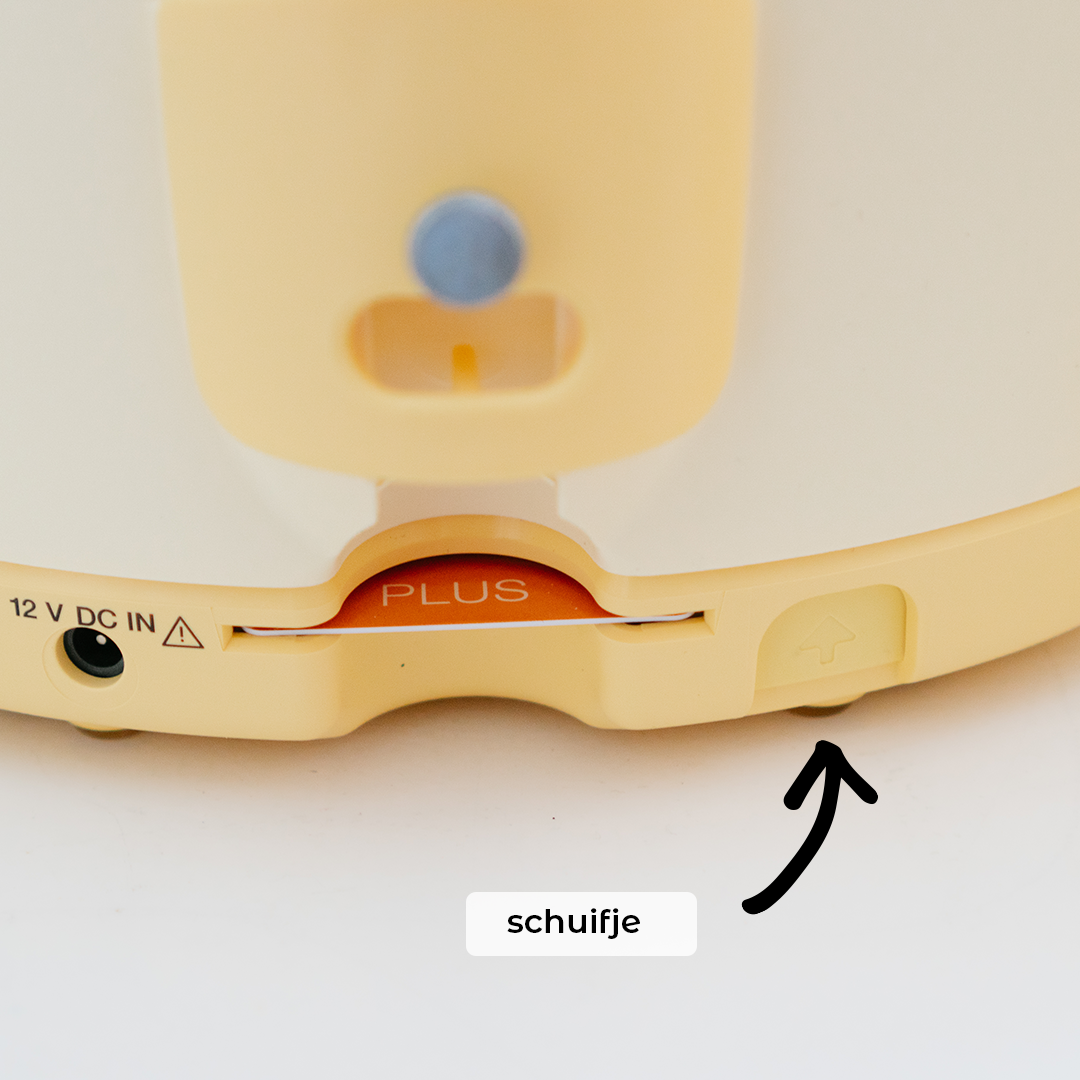
I cannot connect the power cable
There is a small slider on the back of the pump. Slide it upward to reveal the power connection.
How do I connect the pump set to the Ardo Carum?
Instructions are included in the packaging.
The Ardo Carum can be used with:
Follow Ardo’s instructions carefully.
The Ardo Carum is not working properly
Check all connections and assembly. If there is an error message, contact customer service.
A part is broken
We will assist you with a suitable solution. Replacement is always handled via a MYPUMP unit.
How do I connect the cups?
Instructions are included in the packaging.
This pump uses double collection cups.
Follow Philips instructions for proper setup.
The pump is not working properly
Check if cups are correctly assembled and all parts are connected. Contact customer service if needed.
A part is broken
We will help resolve this. Replacement is always handled via a MYPUMP unit.
How do I connect the cups?
Instructions are included in the packaging.
This pump uses a cup set.
Follow Youha instructions carefully.
The pump is not working properly
Check assembly and connections. Contact customer service if needed.
A part is broken
We will assist you with a suitable solution. Replacement is always handled via a MYPUMP unit.
Account:
Yes, you must create an account when placing an order. This is required to receive a locker code.
If applicable with your account, you can easily:
- extend your rental period
- Make, view or change your waiting list status or return booking
No problem. Click “Forgot password” on the login page. You will receive an email to reset your password.
Yes, this is possible.
Your account can be deleted once there is no active rental period or outstanding payment.
Send an email to info@mypump.nl with your request. No further correspondence regarding the deletion will take place.